
Installer Packet
Everything you need to install Focal heaters, in order. Follow the sequence below.
- Safety & Clearances — read before touching hardware
- Install Hub — mount the Focal Hub, plug it in, connect WiFi if needed
- Install Rails — mount and plug in the rail
- Install Heaters — slide each heater onto the rail
- Assign Heaters — match the app to the layout
- Troubleshooting — get help with issues
Before you begin
- Site plan and this packet on hand
- Mounting surface can hold 300 lb
- Dedicated GFCI outlet at the cord-exit end of each rail
- Correct rail + heater count for the config
- Focal Hub and its power cord
- Restaurant WiFi name + password
Before you leave
- All rails plumb, level, and swing under 1/4"
- Every heater clicked in and powering on with LEDs lit
- Cables routed and hidden, nothing below the rail
- Every heater online in the Focal Control app
- Zone map matches the physical layout
- Restaurant walked through System Setup & Control
Questions: support@focalheat.co
Safety & Clearances
v1.4 · 2026-10-15On this page
- Read this first
- General warnings
- Heat & burn hazards
- Electrical safety
- Minimum clearances
- Clearance rules
- Installation & use
- When to stop and call Focal
Read this first
Read these instructions carefully before installing or operating. Improper installation, use, or maintenance may result in serious injury or property damage — use only as directed.
Focal heaters are for covered outdoor areas only, protected from direct rain, water spray, and standing water. They also carry an indoor rating, but must never be where water can reach the unit.
Failure to follow these instructions could result in fire, electric shock, injury, or death.
General warnings
- Read all instructions before installing or operating.
- Use the heater only as described in this documentation. Any other use may cause fire, electric shock, or injury.
- Focal heaters and rails must only be used in the allowable configurations Focal specifies. Never exceed the maximum number of heaters per rail.
Heat & burn hazards
- Do not tamper with or open the interior of the heater.
- Do not keep combustible materials (e.g. furniture, awnings, fabric, paper, decorations) near the heaters.
- Do not hang any objects from the heater or its mounting brackets.
- Do not operate near flammable vapors or liquids such as gasoline or solvents.
The exterior surface can exceed 70°C (158°F) during operation. The only part anyone should ever touch is the pull-cord.
Electrical safety
- The heater runs on 120VAC, 60 Hz. Connect only to a properly installed, GFCI-protected, dedicated outlet.
- Do not use the heater if the power cord or plug is damaged.
- Do not use an extension cord or power strip. Plug directly into a dedicated outdoor outlet.
- Do not run the cord under flooring, decking, or coverings where it can be pinched or damaged.
- Outdoors, always use a weather-protected outlet with an in-use weatherproof cover.
- Unplug the heater before relocating it, or before any cleaning or maintenance, or when not in use long-term.
Minimum clearances
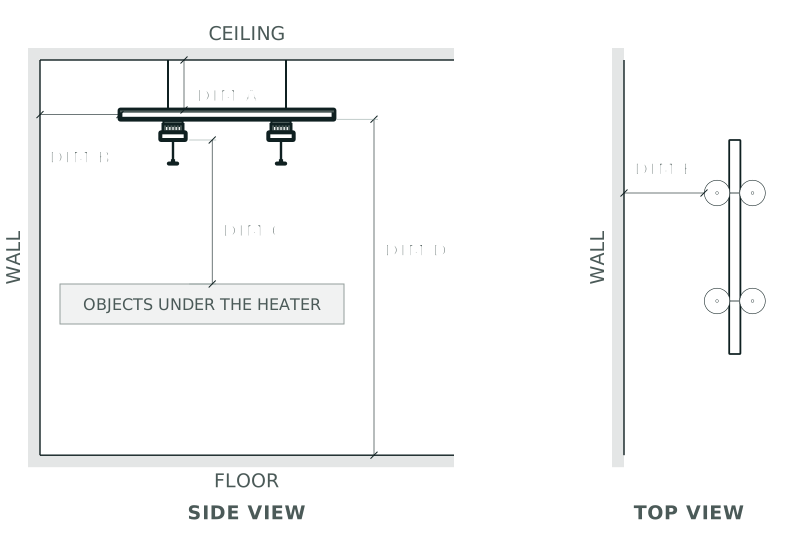
Every install must meet these distances, measured from the heater and rail to the nearest surface.
| Reference | Dimension | Minimum distance |
|---|---|---|
| Ceiling, above rail | A | 0 in (0 cm) |
| Wall, side of rail | B | 20 in (51 cm) |
| Objects under the heater | C | 36 in (91 cm) |
| Floor to bottom of rail | D | 84 in / 7 ft — use 90 in where people walk under |
| Wall to side of heater facing down | E | 20 in (51 cm) |
Note: each round heating spot is 8” in diameter on either side of the rail. Two rails mounted end to end must keep at least 4” of space between them.
Clearance rules
Mount above the table surface, out of the way of normal use.
Mount where people brush against the heater or its hot parts.
- Never install heaters or place objects near them without meeting the required clearances.
- Never block or obstruct the front of the heater.
- Keep curtains, awnings, umbrellas, and fabric roofs at least 20 in from the heater, and never hang or drape anything on the rail or heaters.
Installation & use
- Install only on solid surfaces capable of holding 300 lb.
- Keep the power cord away from hot surfaces and the heated air from the front of the heater.
- Do not power on the heater until installation is complete, clearances are verified, and mounting is secure.
When to stop and call Focal
Discontinue use immediately and contact Focal Support if you notice any of these:
- Physical damage to the housing or grille
- Burned, frayed, or damaged power cord or plug
- Unusual odors or sounds during operation
- Heater won't turn on or respond to controls
- Any other visible or suspected electrical or heating damage
The heater has no user-serviceable parts. All service beyond basic cleaning must be done by Focal-authorized personnel.
Install Hub
v2.4 · 2026-10-22On this page
Before you start
The Focal Hub is the heaters’ link to the internet. It lets guests turn on heat with the QR code, lets staff control heaters from the Focal Control app, and runs schedules. If it loses its signal, all of that stops working, so placement matters.
Some Hubs arrive already configured for the restaurant’s WiFi. Others you configure on site, which takes a couple of minutes from your phone. Once it’s plugged in, you’ll check which one you have.
You need:
- The Focal Hub and its power cord
- The site plan, which marks the Hub Location
- A phone, plus the restaurant’s WiFi network name and password (from Focal or the restaurant), in case the Hub isn’t configured yet
The restaurant should already have checked that their WiFi meets the WiFi Requirements where the Hub goes.
Where to mount it
If the site plan marks a Hub Location, mount the Hub there. If that spot won’t work, mount it as close to it as you can, since that’s where the restaurant tested their WiFi.
If there’s no Hub Location, or nothing workable nearby, follow the location guidelines in WiFi Requirements: covered, near a standard outlet, in line of sight and within 50 ft of the heaters.
The Hub talks wirelessly to the heaters and, unless there’s a network cable, to the restaurant’s WiFi. Wherever you mount it:
- The Hub needs a clear line of sight to every heater, with no walls in between.
- Between the Hub and the restaurant’s router, the fewer walls the better. WiFi passes through clear glass. Brick, concrete, stone, metal and tinted or energy-efficient (low-E) glass block it.
Mount it up high and in the open, with a clear view of the heaters.
Tuck it behind a wall, metal or ductwork, or near metal shelving, kitchen equipment or a walk-in cooler.
Steps
Check the WiFi connection before you mount the Hub. The QR code is on top of the Hub, so you can't reach it once it's mounted, and it only works while the Hub has power.
Hold the Hub at the designated spot and plug it into a standard outlet. Avoid outlets on a light switch: if the outlet loses power, the heaters go offline.
Skip this step if the restaurant ran a network cable to the Hub Location. Otherwise, with the Hub plugged in, scan the QR code on top of the Hub with your phone's camera. When your phone asks you to sign in to the network, tap Sign in. The page that opens shows whether the Hub is connected. If it is, move on to mounting. If not, enter the restaurant's WiFi network name and password, and the page should then show the Hub as connected.
Use the network the restaurant tested, usually their staff WiFi. Guest WiFi with a sign-in page won't work. If the page still doesn't show the Hub as connected, check the network name and password and try again, then contact Focal.
Mount the Hub on the wall at the designated spot, keeping it plugged in.
If the restaurant ran a network cable to the Hub Location, plug it into the Hub. Leave a drip loop: let the cable hang down below the Hub's port before it rises back up into it, so water drips off the bottom of the loop instead of running into the Hub. No cable? The Hub uses WiFi instead.
Final checks
- Hub is mounted at the Hub Location, or as close to it as you could get
- Hub is plugged into an outlet that isn't on a light switch
- Network cable, if any, is plugged in with a drip loop
- No network cable: the Hub's sign-in page shows it's connected
If you used a network cable, you can’t see from the Hub whether it’s online yet. You’ll find out when you assign heaters: if heaters won’t assign or don’t respond, check the Hub first.
Install Rails
v1.4 · 2026-10-15On this page
- Before you start
- About the rails
- What’s in the mounting kit
- Rail placement over the table
- Watch the video
- Mount the rail
- Different mounting methods
- Post-mount checks
- Plug in the rail
Before you start
Read Safety & Clearances before you begin. It covers the minimum clearances this install has to meet.
The site plan specifies where each rail goes and how long it is. Confirm the exact location against the plan before you mount anything.
Heaters slide on and off only at the opening end of the rail, the end opposite the cord-exit end. Leave at least 4” past the opening end to slide a heater on, clear of walls, posts and beams.
Confirm the mounting surface is solid and can hold 300 lb
Mount to anything that flexes or isn't rated for the load.
Do not power on the rail until mounting is complete and clearances are verified.
About the rails
The rail holds the individual Focal heaters, which can be installed after the rail is up. Rails come in three lengths:
| Rail | Actual length | Max heaters | Max current | Receptacle |
|---|---|---|---|---|
| 4 ft | 53.5” | 2 | 15A | NEMA 5-15R |
| 6 ft | 80.5” | 3 | 20A | NEMA 5-20R |
| 8 ft | 98.5” | 3 | 20A | NEMA 5-20R |
Each rail has a T-slot running its length for T-nuts, and an 8-foot built-in power cable. Focal offers mounting hardware but off-the-shelf hardware also works utilizing the T-slot.
What’s in the mounting kit
Every rail ships with the same kit: two pre-built rail blocks, two of each overhead bracket, plus fastener options for whichever mount and fastening method suit your structure.
Rail blocks
Two per rail, pre-built. These slide into the rail’s T-slot, and the dropdown pipes seat into them.
| Part | Qty |
|---|---|
| Parallel bracket | 1 |
| T-nut, 1/4-20 | 1 |
| Set screw, 1/4-20 x 5/16” | 2 |
| Flat-head screw, 1/4-20 x 1.125” | 2 |
Overhead brackets and pipe
The brackets fasten to the structure and hold the top of each dropdown pipe. Pick one type, parallel or perpendicular, and use two per rail. See Mount the rail.
| Part | Qty | Use |
|---|---|---|
| Parallel bracket | 2 | Ceiling mount, underside of a member |
| Perpendicular bracket | 2 | Beam/joist mount, vertical face |
| Set screw, 1/4-20 x 5/16” | 4 | Clamps pipe into bracket |
| Dropdown pipe, 6 ft | 1 | Cut to drop length (up to 3 ft) |
Through-mount fasteners
Nut on the far side. Pick the screw length for your material thickness.
| Part | Qty |
|---|---|
| Flat-head screw, 1/4-20 x 1.5”/2.5”/3.5” | 4 each |
| SAE washer, 1/4” ID | 4 |
| Nylon lock nut, 1/4-20 | 4 |
Wood screws
For solid wood where you can’t reach the far side.
| Part | Qty |
|---|---|
| Wood screw, #12 x 2”/3” | 4 each |
Tools
One of each.
| Tool | Drives |
|---|---|
| 1/8” L-wrench | Set screws |
| T30 L-wrench | Machine screws (1/4-20 flat-head) |
| T25 screwdriver bit | Wood screws |
Rail placement over the table
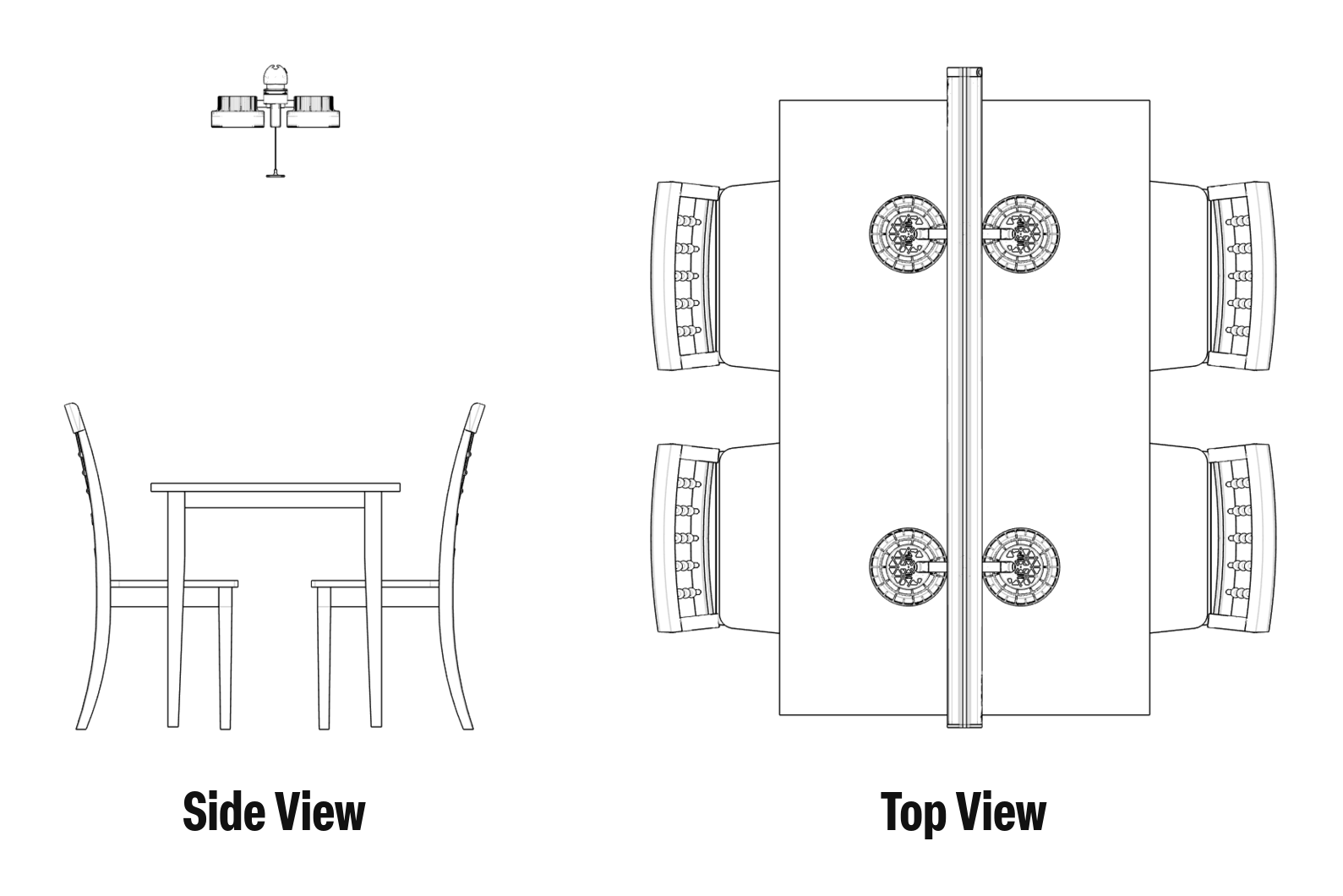
Ideally the rail runs down the center of the table, so heat hits the middle of each guest’s chest, not the top of their head. If the rail has to be off-center, Focal can angle the heaters toward the guests. Contact Focal to arrange it.
Watch the video
Watch the full video once before you start. Refer to the step-by-step written instructions below.
 Watch this step at https://support.focalheat.co/rail-installation/#mount-video
Mount the rail
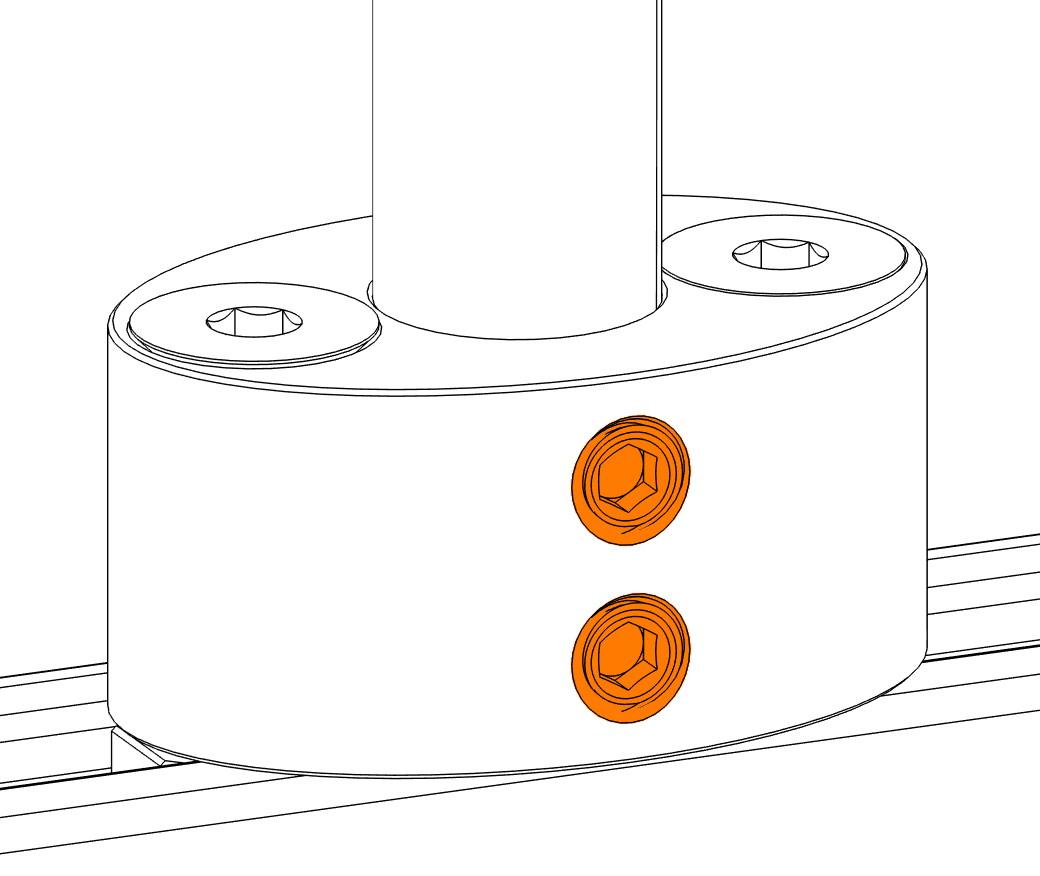
Keep the T-nut screws on top loose so the blocks can slide, and make sure the set screws are backed out enough for the pipe to fit.
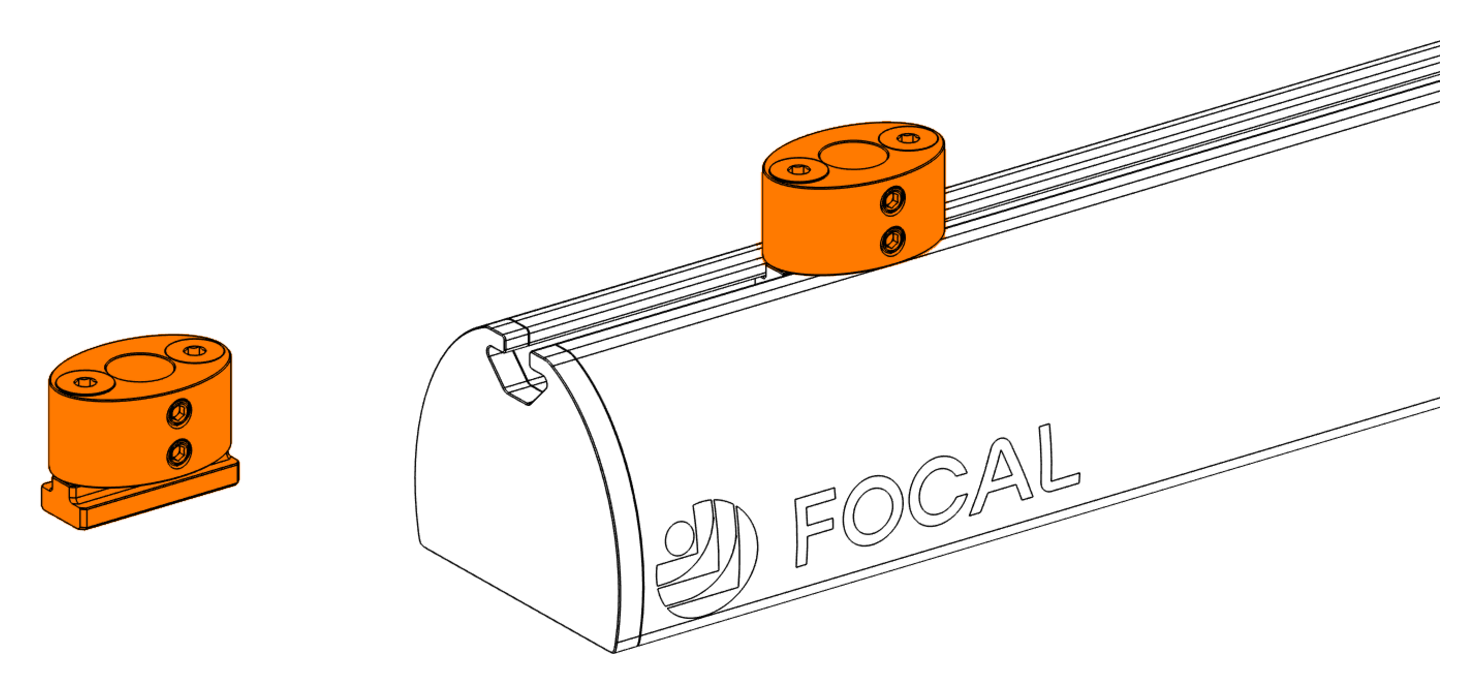
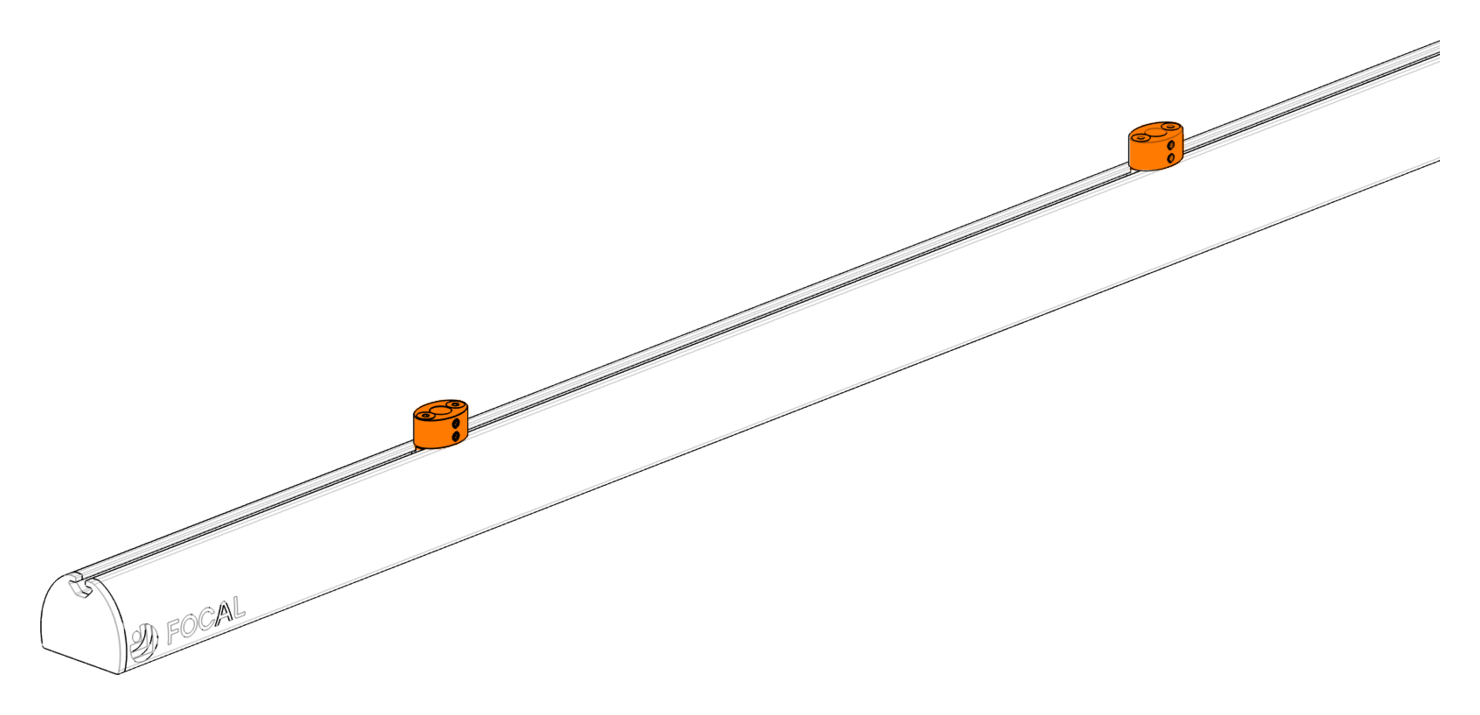
Use a ceiling mount or a beam or joist mount, whichever fits your structure. Fasten each bracket with #12 wood screws into solid wood, or through-bolt it with the 1/4-20 screws, washers and lock nuts. Space the brackets to match the rail blocks. Cut each pipe so the rail hangs at the site plan height, allowing 2.25" for the rail itself, then deburr the cut.
Use the parallel bracket where you can fasten to the underside of an overhead member.
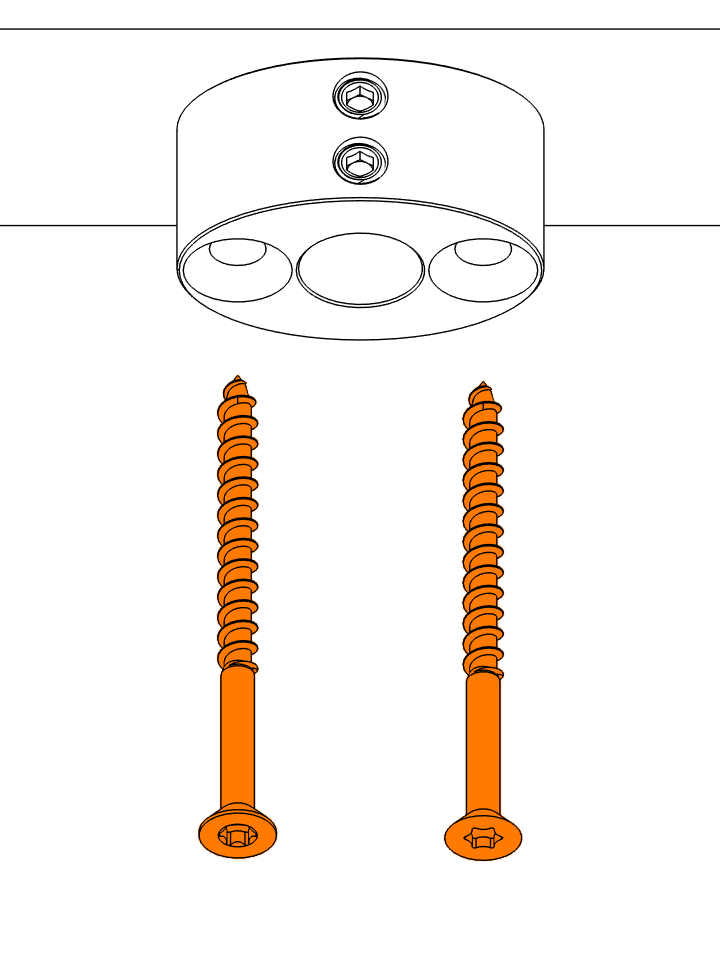
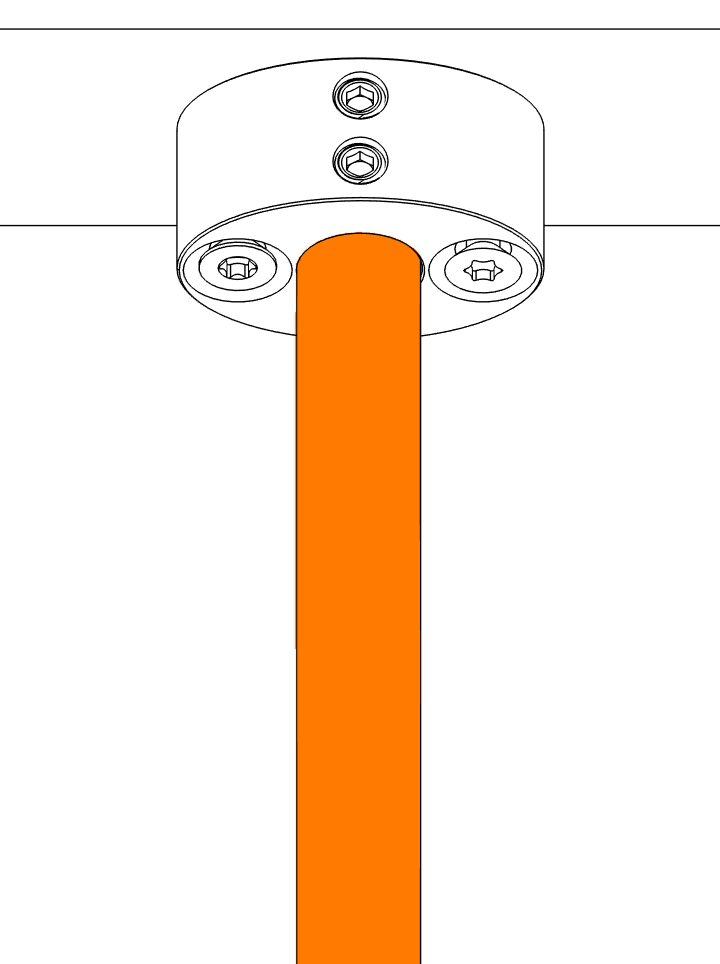
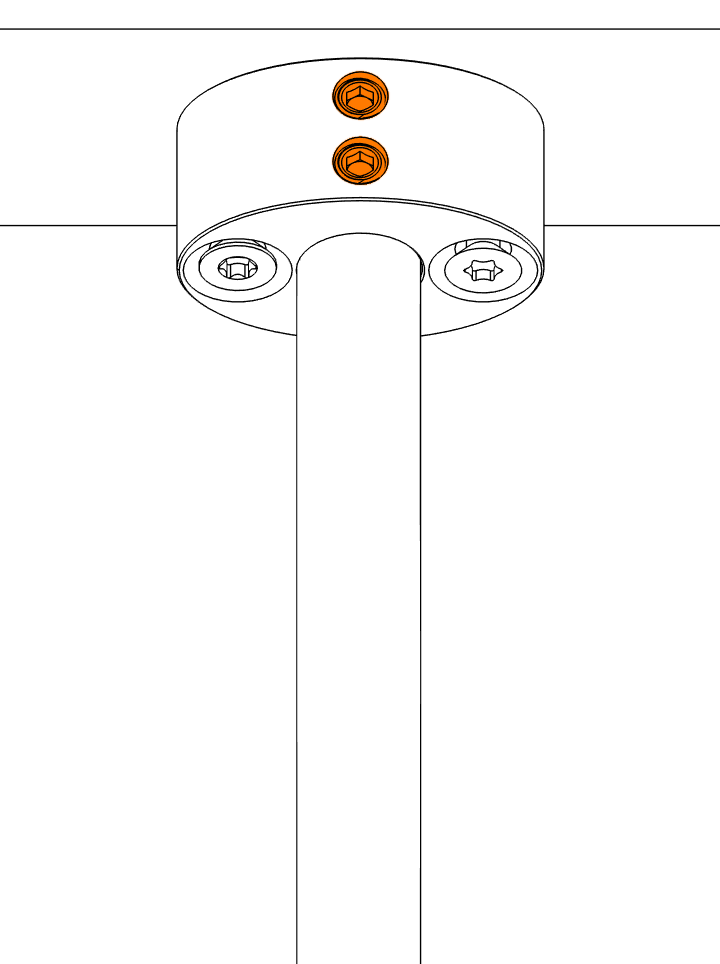
Repeat for the second mount, matching the drop length so the rail hangs level.
Use the perpendicular bracket where the only solid surface is a vertical face, such as the side of a beam or joist.
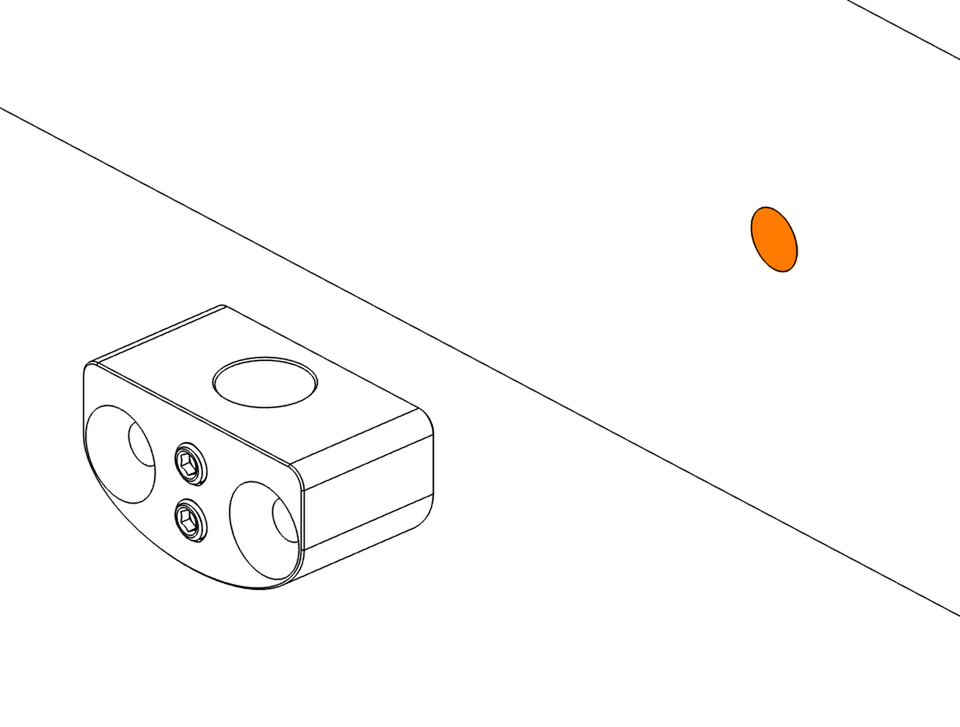
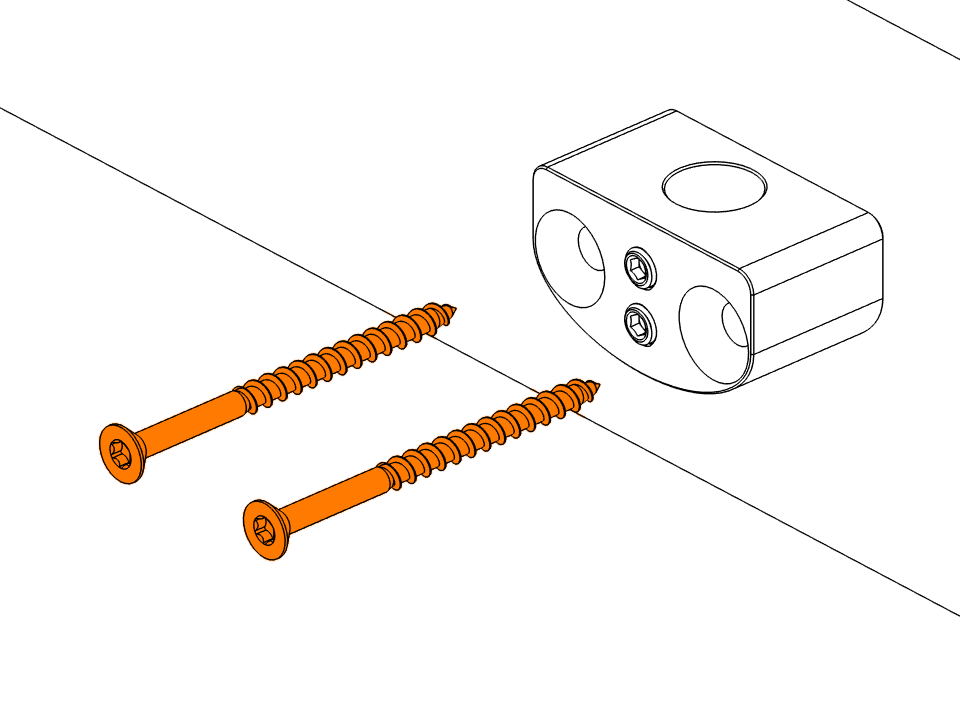
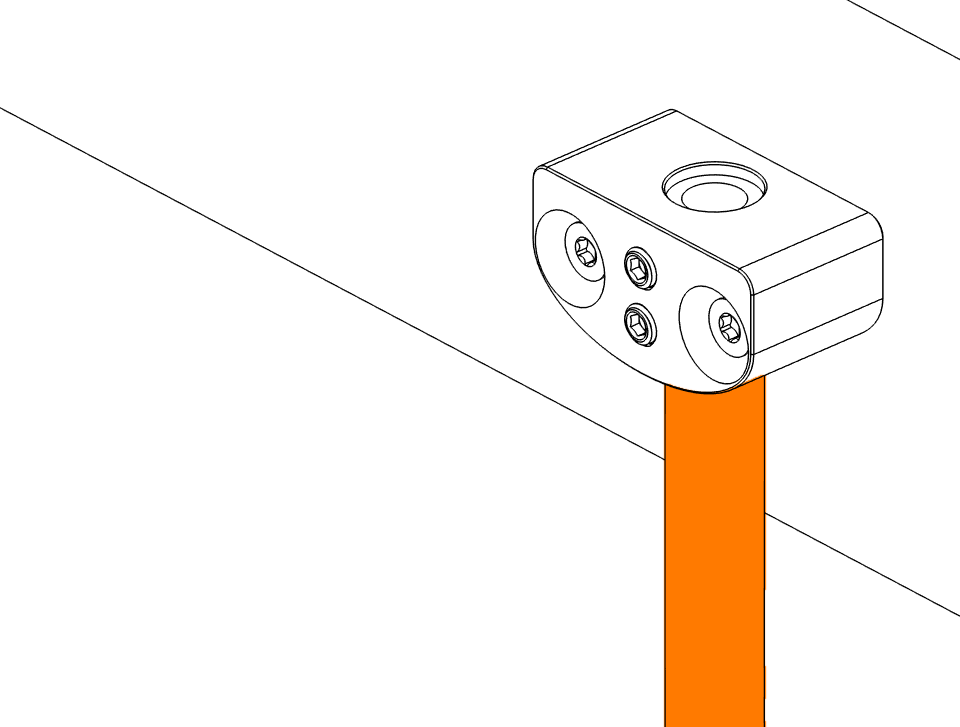
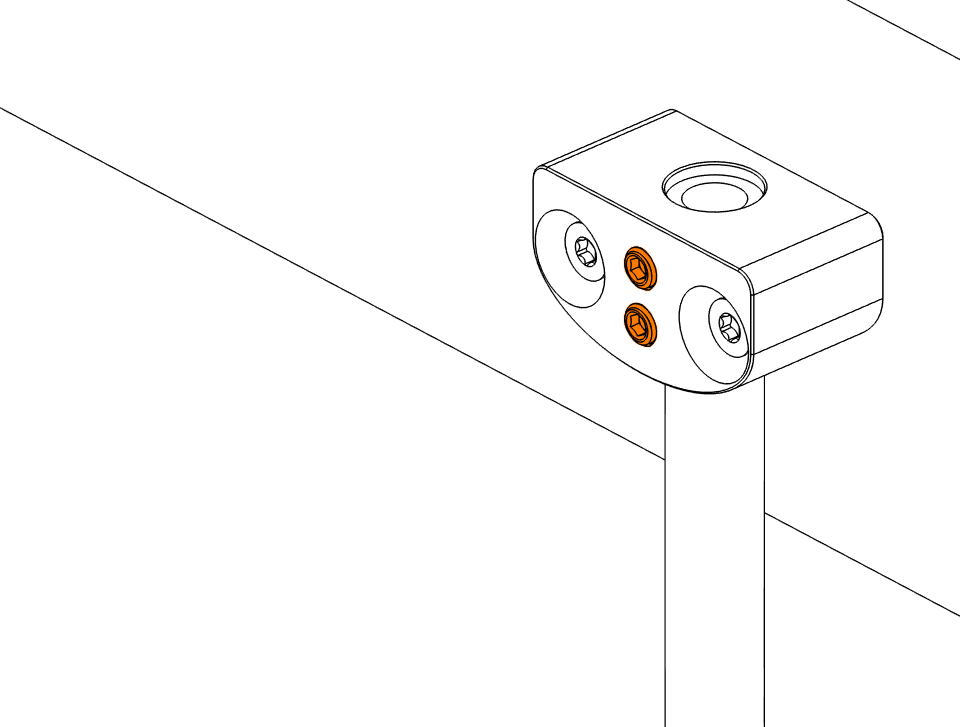
Repeat for the second mount, matching the drop length so the rail hangs level.
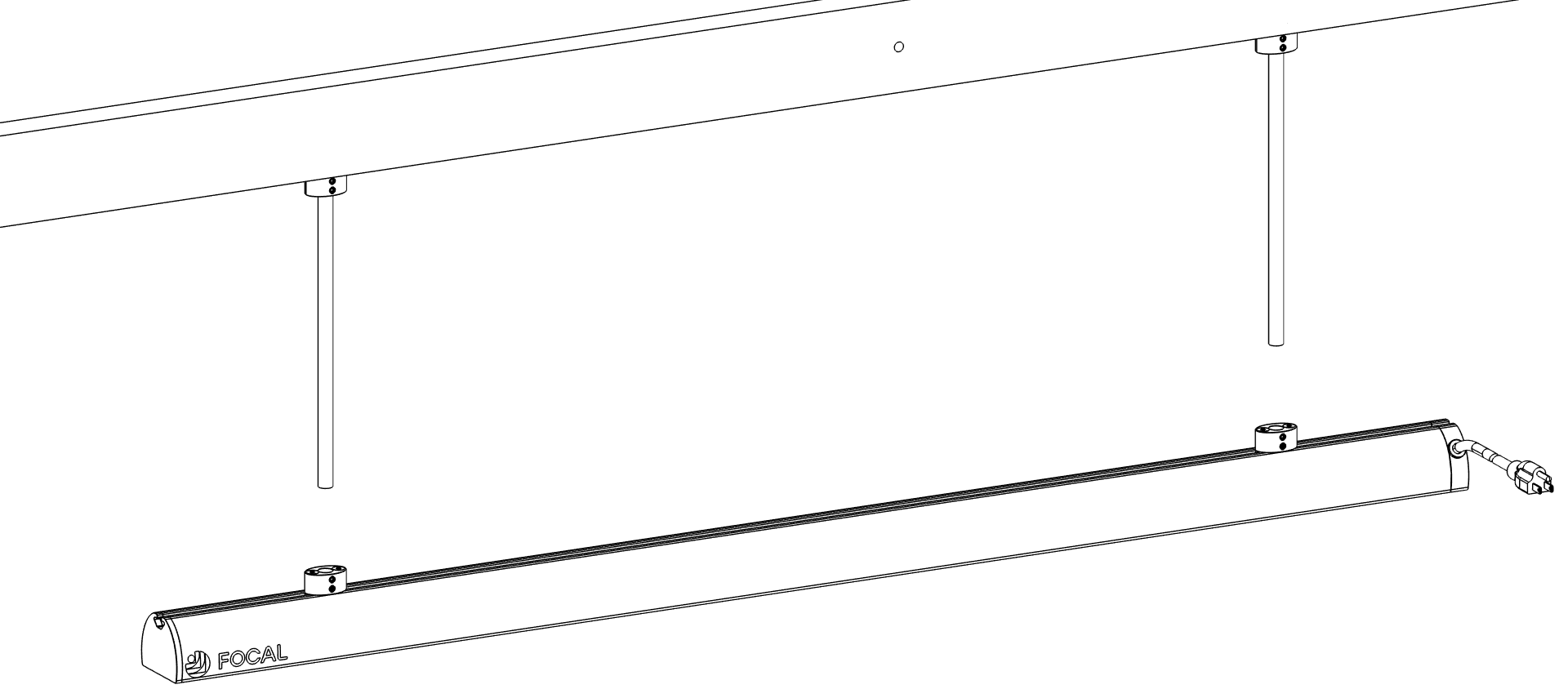
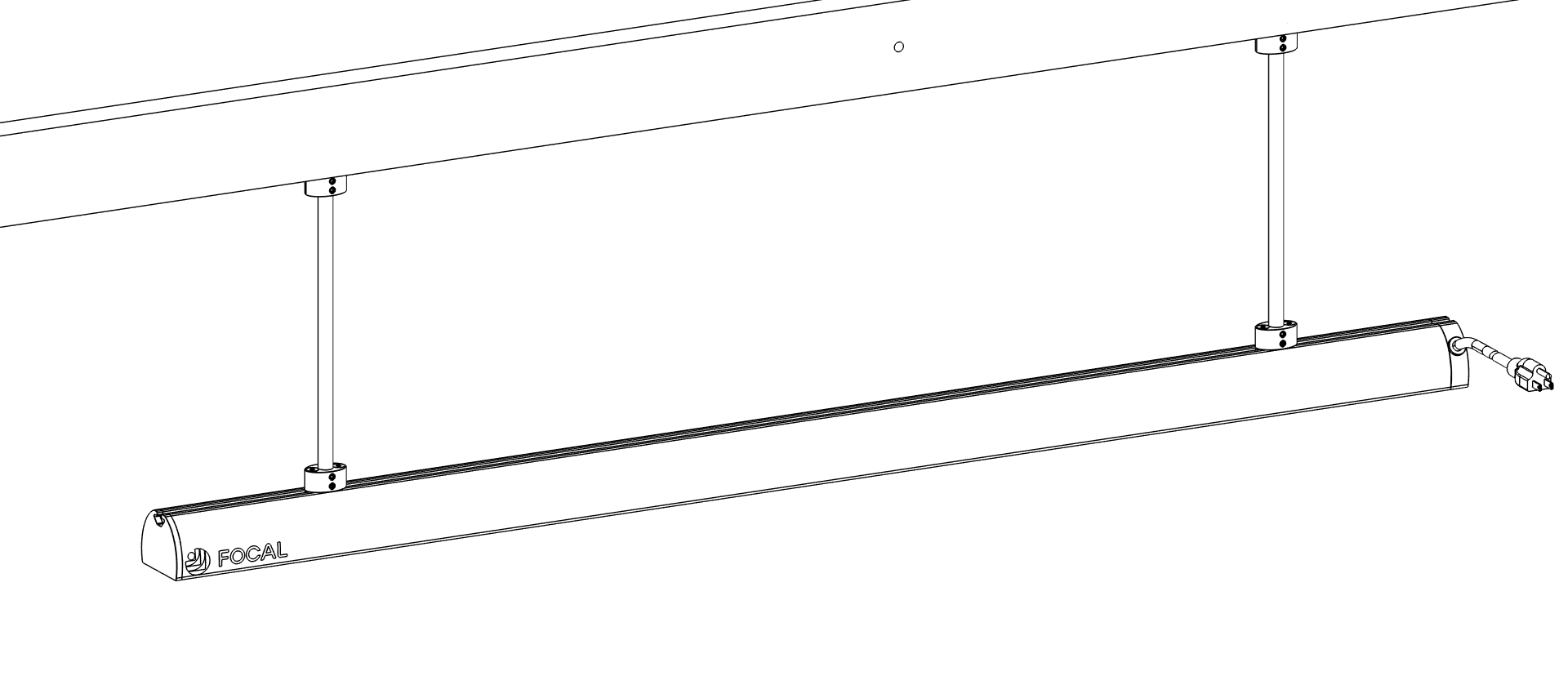
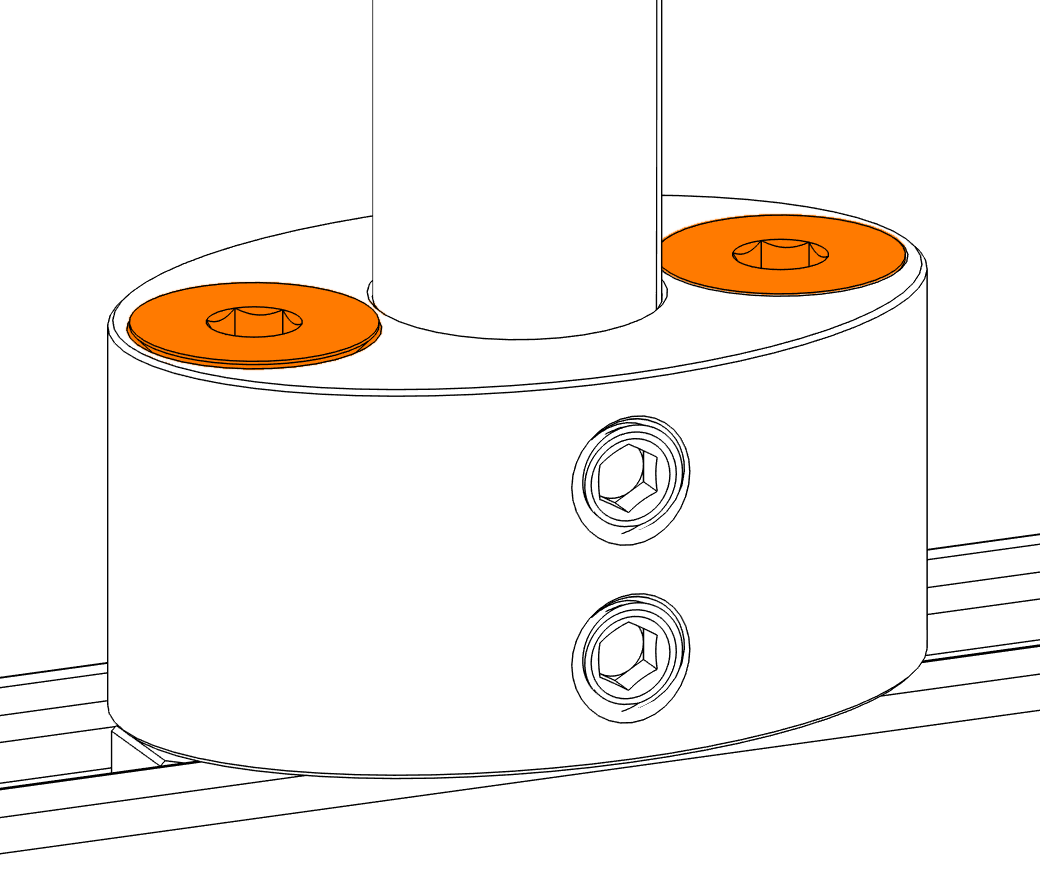
Make sure the pipes hang straight down and give the rail a shake to confirm it's solid.
Go back to every mount and re-tighten each set screw with the 1/8" L-wrench, using the full handle until it stops.
Under-tightened set screws will allow the rail to drop under load.
Different mounting methods
Any mounting hardware must connect to the rail through T-nuts, but some sites need a different approach:
- A threaded rod as a drop-down
- A U-bolt to attach unistrut to a pipe
- Mounting directly through a wood beam without a drop-down, using the longer 1/4-20 flat-head screws with SAE washers and nylon lock nuts
- An L-bracket to unistrut when rails run perpendicular to a wall
Post-mount checks
- Set screws fully tightened on every mount
- All other fasteners fully tightened
- Pipes plumb and rail level
- Rail height and location match the site plan
- All clearances in Safety & Clearances are met
- Rail swings no more than 1/4" from rest in either direction
If the rail swings more than 1/4", add aircraft cable or bracketing to stiffen the assembly before loading heaters.
Plug in the rail
Plug directly into a dedicated, GFCI-protected outdoor outlet on its own circuit.
Use an extension cord, power strip, or a circuit shared with other loads.
Run the cable along the rail, up the mounting hardware, or along parklet features so it stays out of sight from diners and the street. Plug into the outlet, then turn on the rail switch. It’s on the cord-exit end, underneath the rail. Secure any slack so nothing hangs below the bottom of the rail.
Install Heaters
v1.5 · 2026-10-15On this page
- Before you start
- Watch the video
- Open the rail end
- Install each heater
- Close up the rail
- Final checks
Before you start
The rail should already be mounted, plugged in, and switched on. Heaters slide onto the rail from the opening end, opposite the cord-exit end. Each Focal heater (Duo) has two heating spots and gets its power from the rail when it locks into a slot, so there is no separate cable to connect. After this, you’ll assign each heater to its slot in the Focal Control app.
You need:
- A 2 mm hex wrench for the bumper and end cap screws
- The heaters for this rail, per the site plan
Handle each heater by its body, keeping the emitters and grille clear.
Grab or set the unit down on the grille or reflector.
Watch the video
Watch the full video once before you start. Refer to the step-by-step written instructions below.
 Watch this step at https://support.focalheat.co/install-heaters/#install-video
Open the rail end
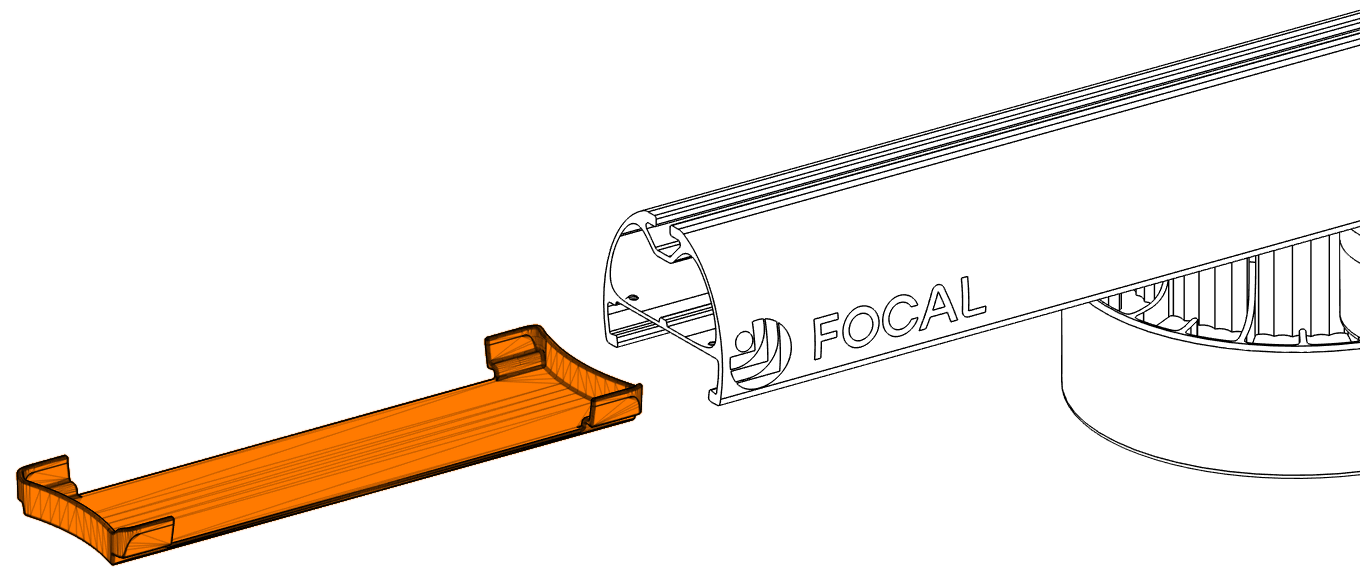
Work at the opening end of the rail, opposite the cord-exit end. This is the end with the removable end cap (orange).
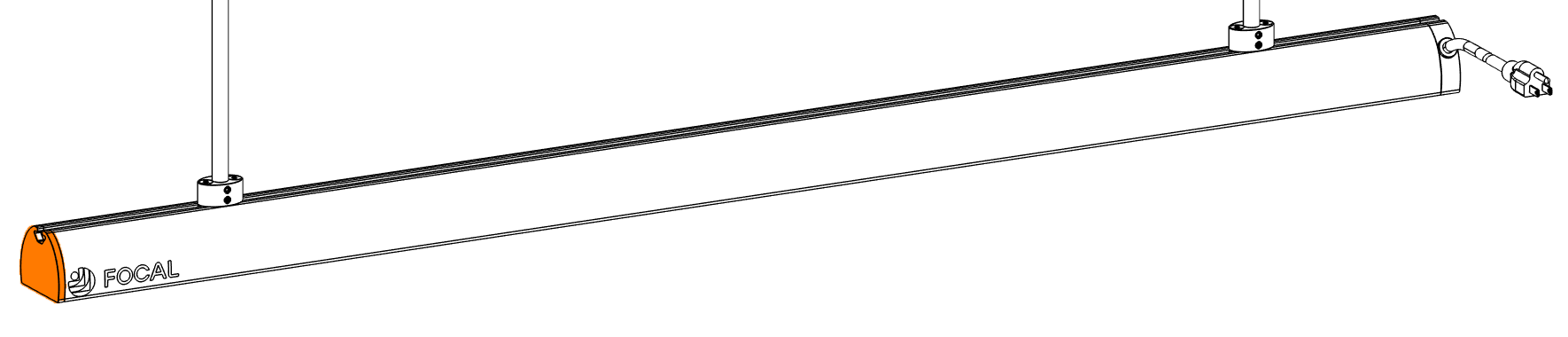
Look up at the underside of the rail.
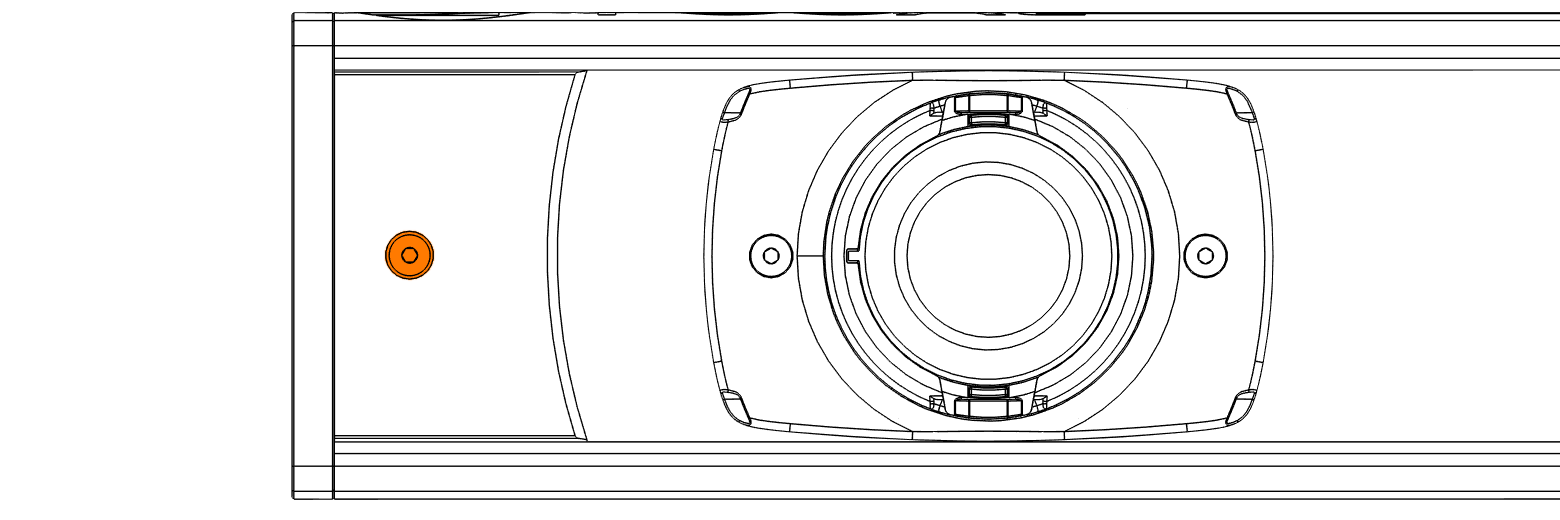
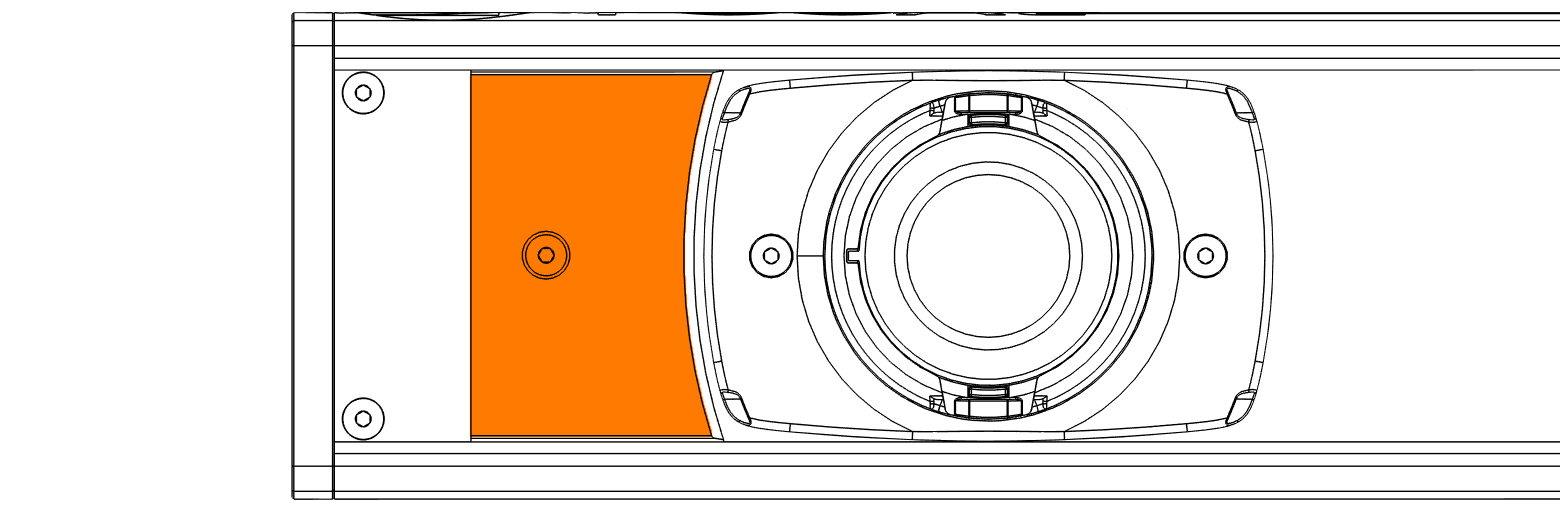
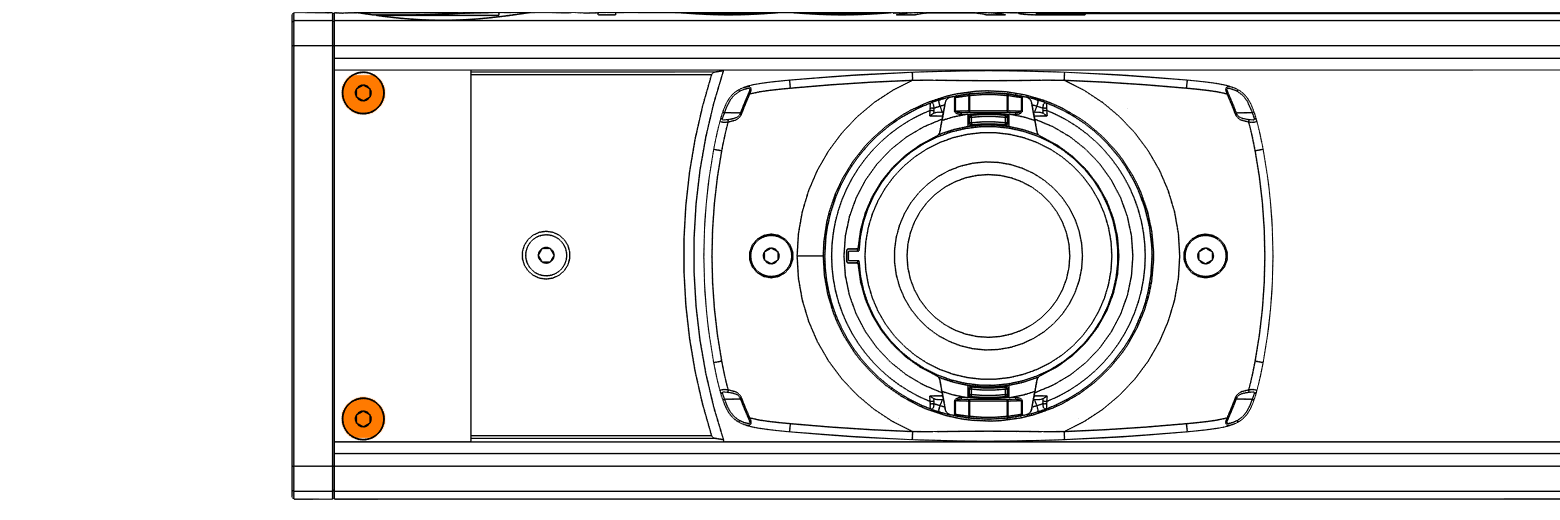
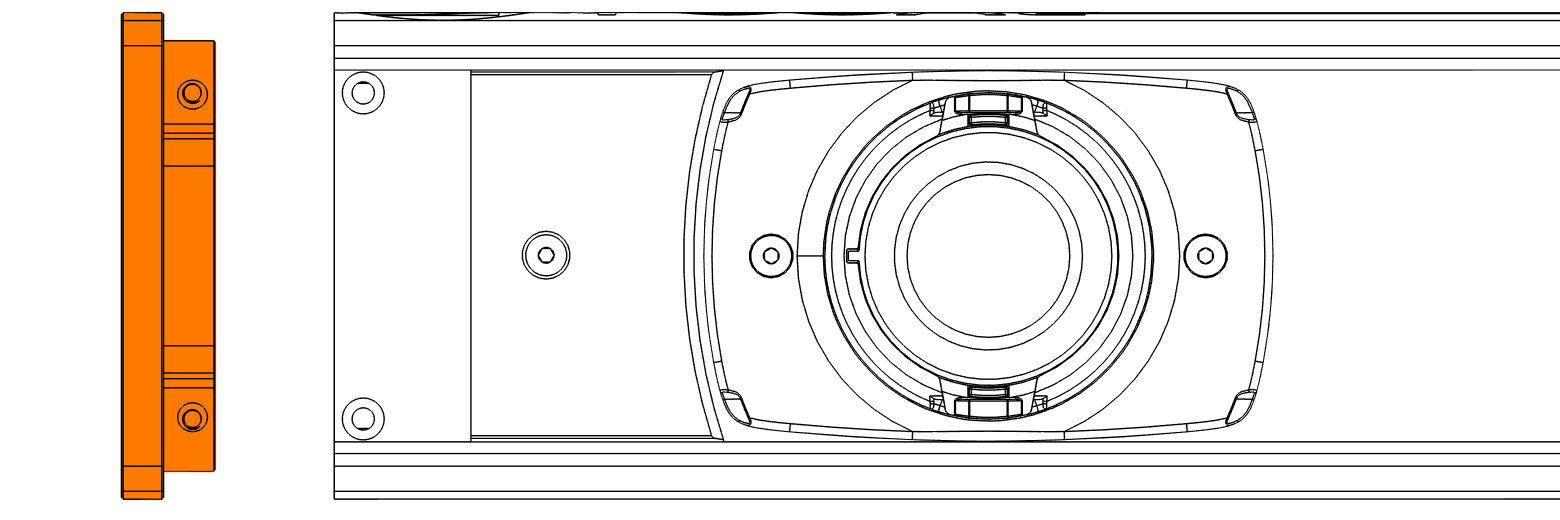
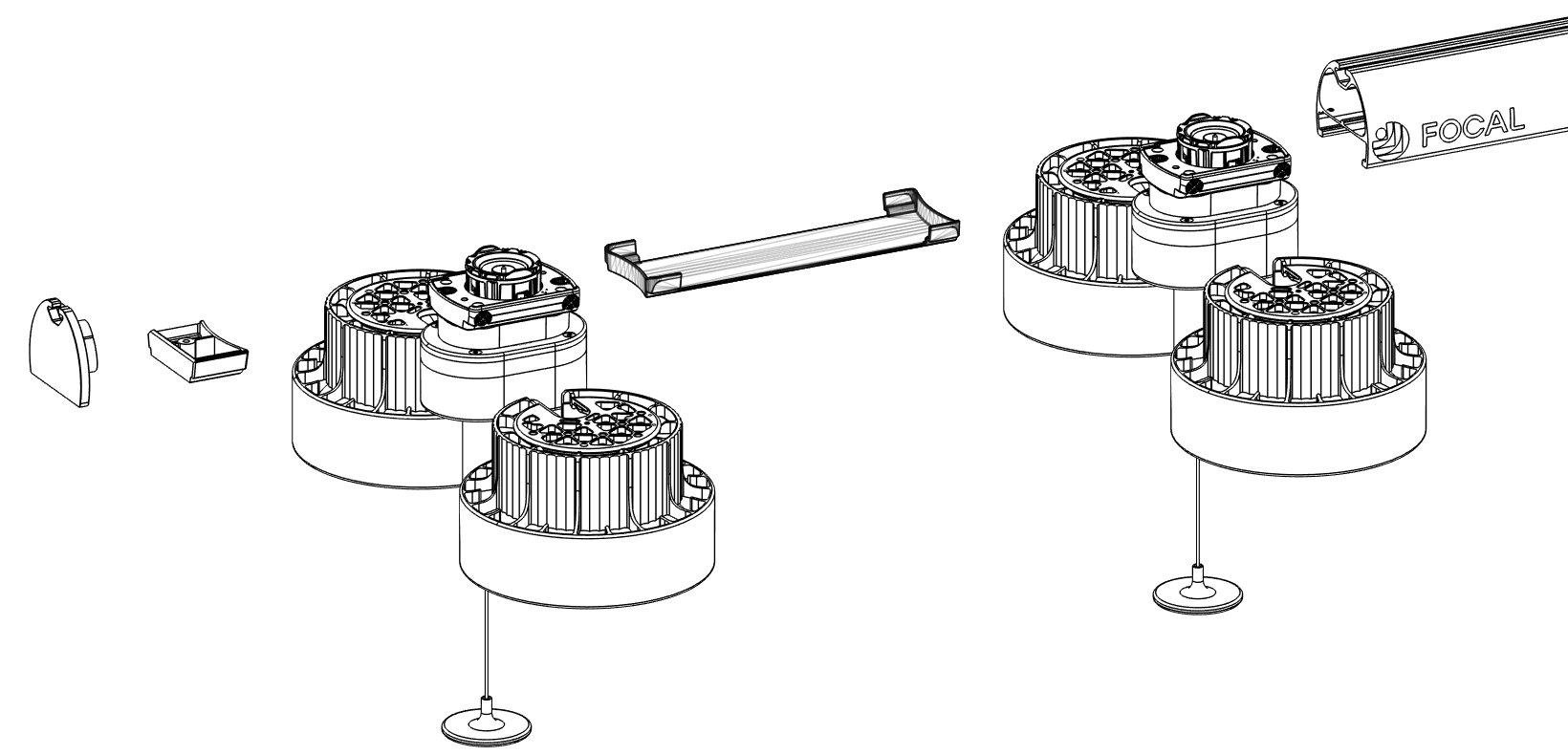
Slide the bumper and the spacer(s) off the opening end of the rail. The spacers go back in between the heaters as you install them, and the bumper goes back on last.
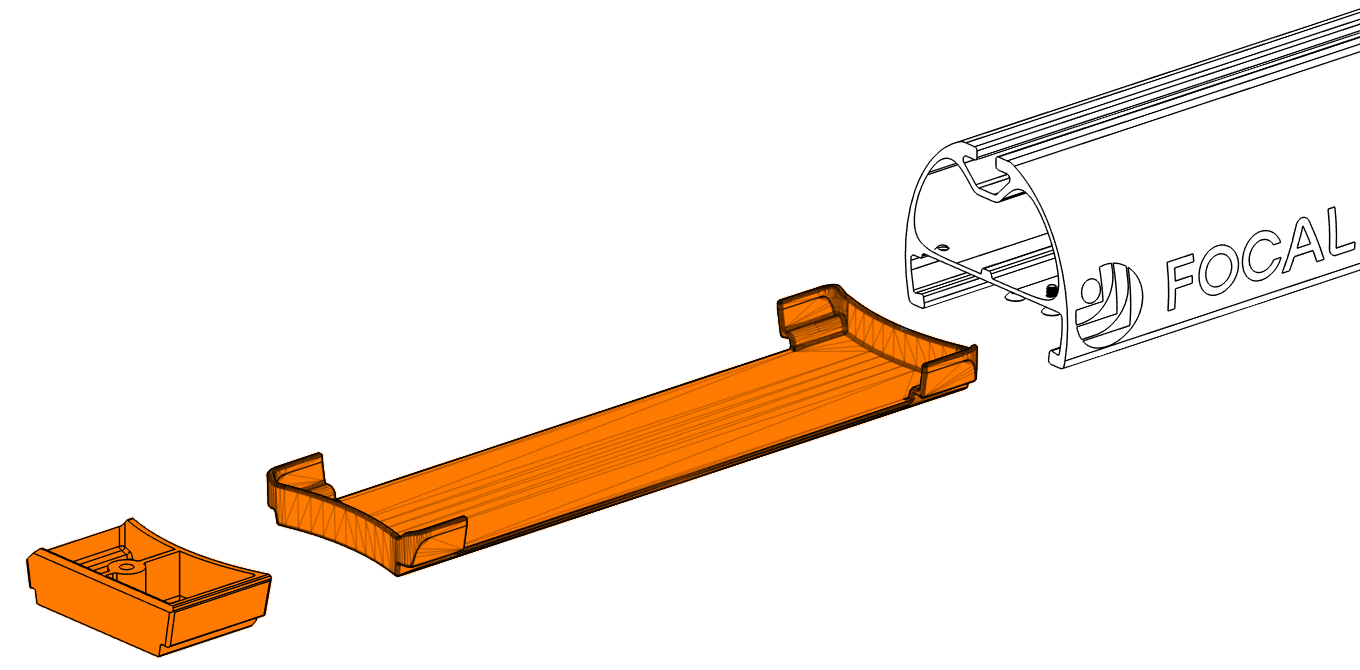
Install each heater
Take the heater out of its box. Leave the rest of the packaging on until the heater is started onto the rail.
Heaters slide on from the opening end of the rail. The heater only fits one way: hold it with the pull string on the trailing side, away from the rail.
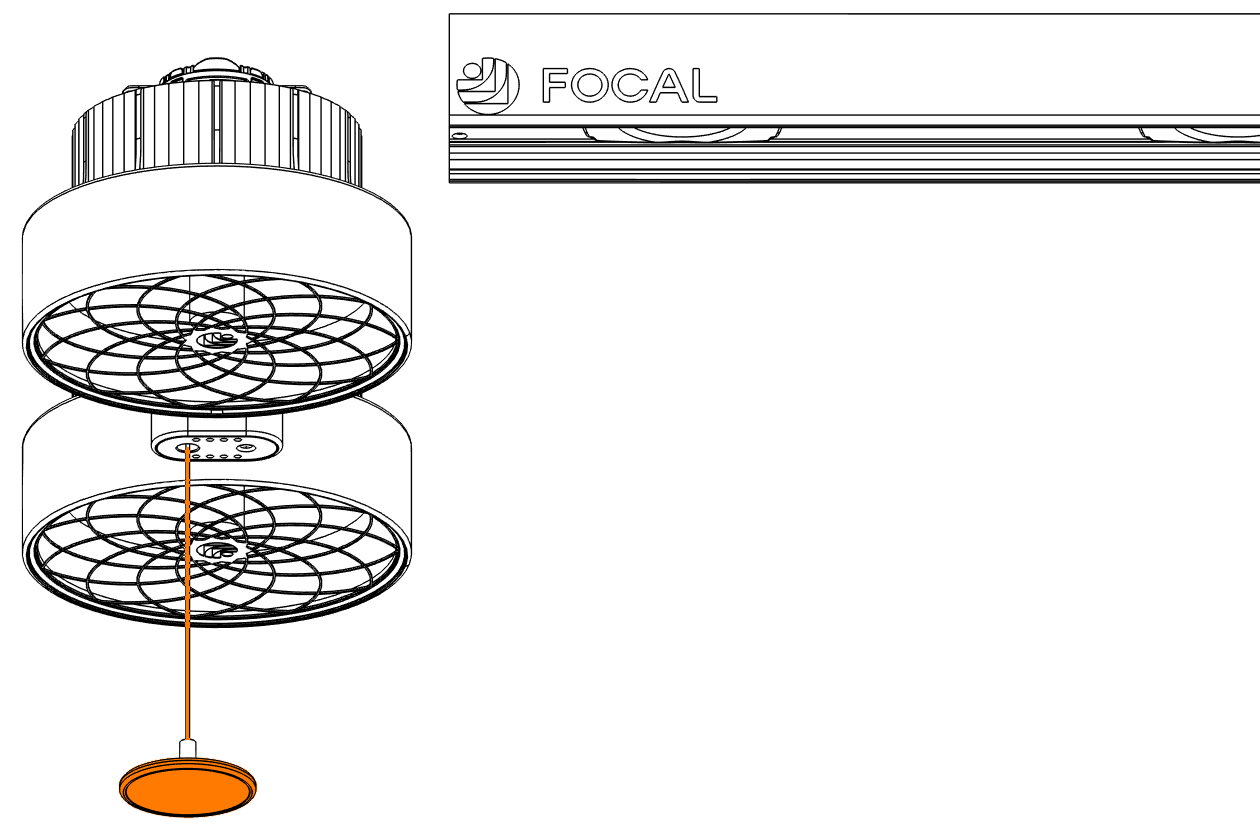
The lug (the round power connector on top of the riser) must be down for the heater to slide onto the rail. A new heater ships with a small plastic clip holding the lug down. It slides off by itself as the heater goes onto the rail. If there's no clip and the lug is up, pull the pull string down until the lug drops.
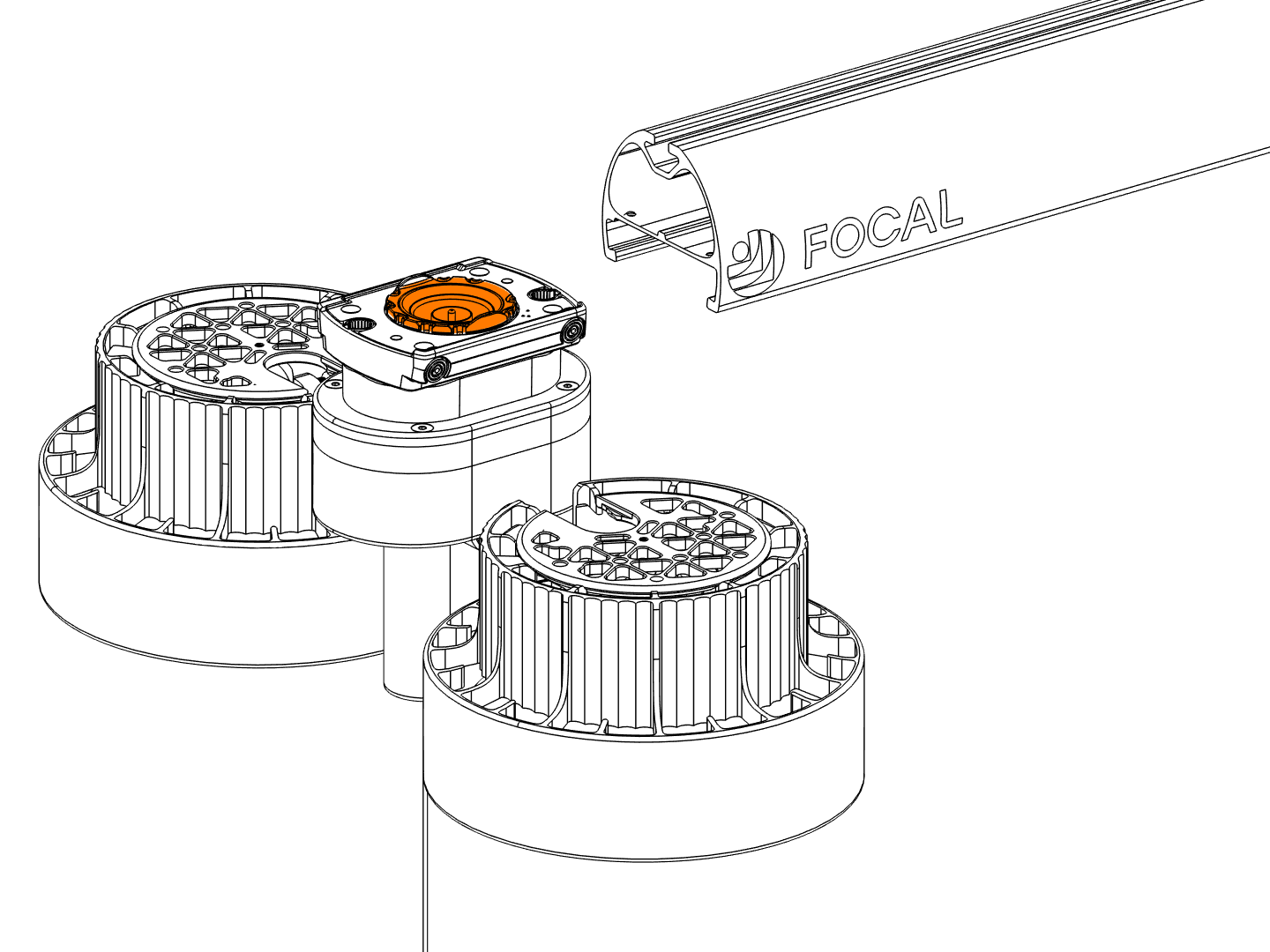
Any heater can go in any slot. Fill the one farthest from the opening end first. Slide the heater onto the rail and remove the rest of the packaging. Pull the string down firmly to release the heater, slide it to its slot, and let go. It locks in and its LEDs light.
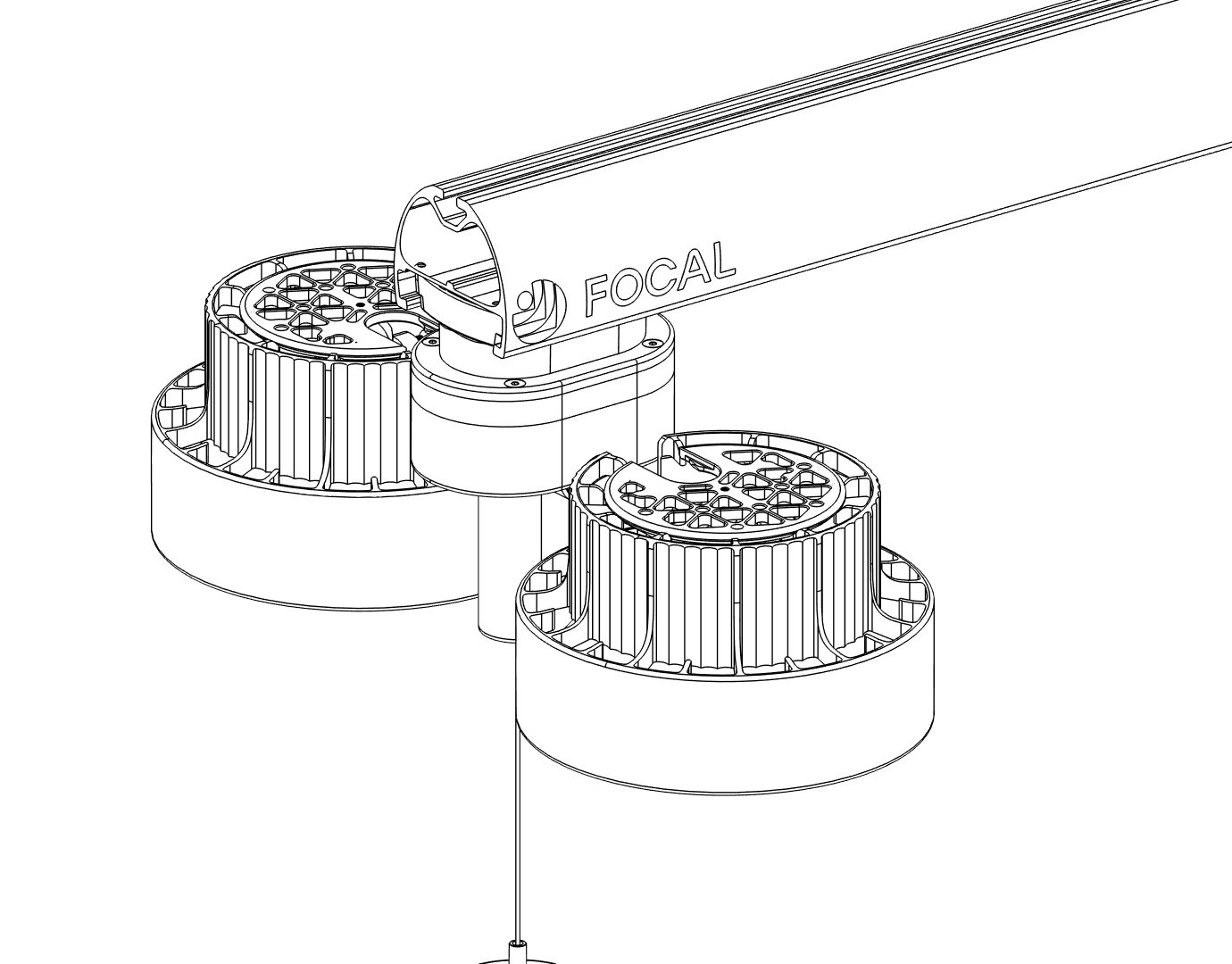
Insert a spacer after the heater. Repeat for each heater, adding spacers between heaters. There should be one spacer in between every pair of heaters.
Close up the rail
Final checks
- Every heater is seated in a slot and LEDs lit
- There is a spacer between each pair of heaters
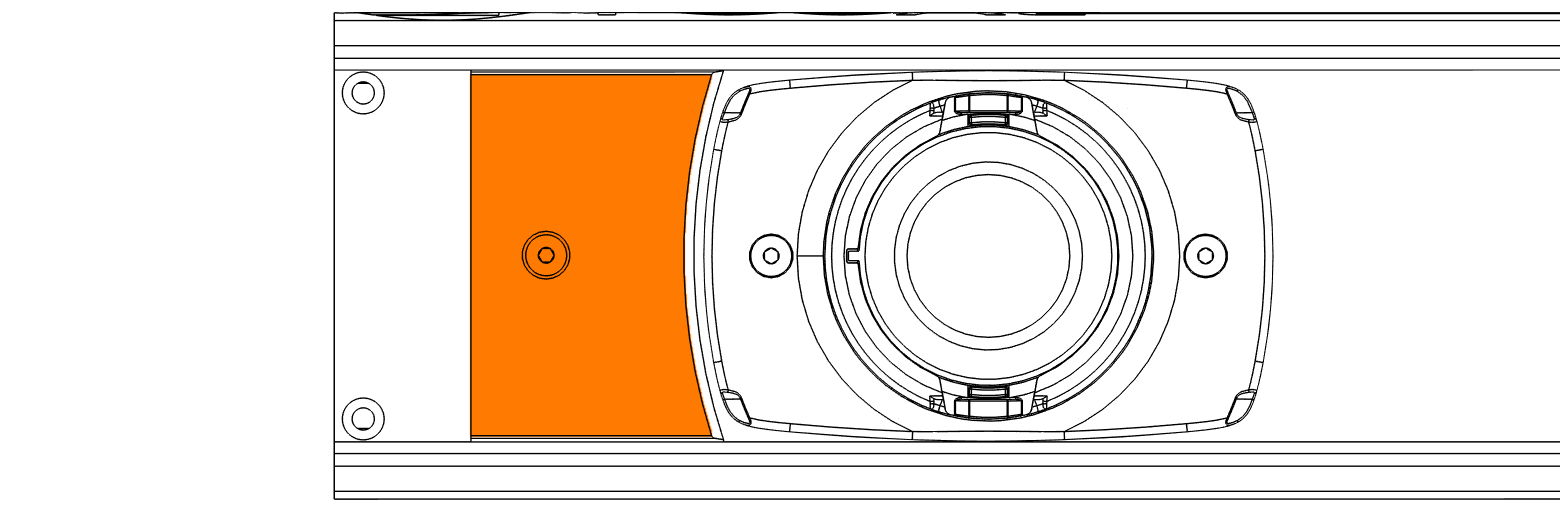
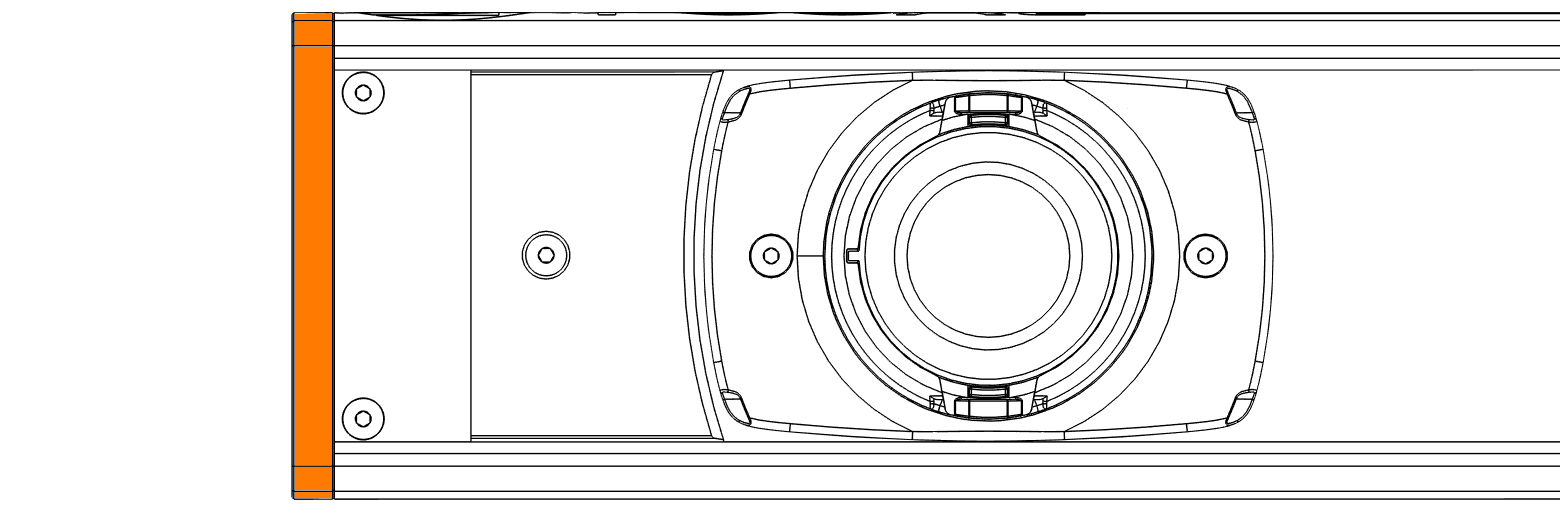
- Bumper back on the rail, end cap screwed on, and bumper screw tightened
You're not done yet. Staff can't control these heaters until each one is assigned to its slot in the Focal Control app. Assign them now, before you leave the site.
Assign Heaters
v1.5 · 2026-10-22On this page
- Before you start
- Assign each heater to its slot
- Confirm every assignment
- Final checks
- Install complete
Before you start
Assigning heaters allows staff to control heaters individually in the Focal Control app.
You need:
- A mobile phone with internet and a camera.
- The restaurant’s Focal Control app link and password from Focal.
- Every heater already seated in its rail slot and powered on.
- About 30 minutes.
Heaters can only be assigned while the site is online. If heaters won't assign or don't respond, check that the site's Focal Hub, or networking box on older systems, is plugged in and has internet. If it does and heaters still won't assign, contact Focal.
The software layout must match reality. If a heater is assigned to the wrong slot, staff will turn on the wrong heater and think the system is broken.
Assign each heater to its slot
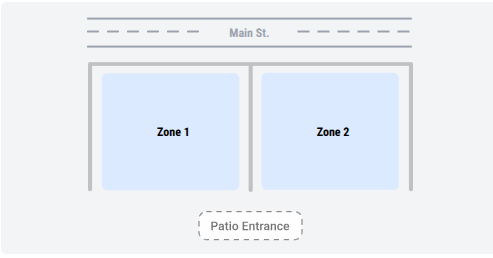
Sign in with the link and password from Focal. The restaurant map shows how the zones are laid out relative to the street and the patio entrance. Get oriented here before you start scanning, so you know which zone you are standing in.
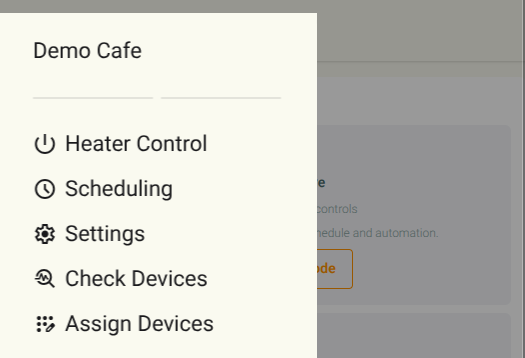
Tap the menu icon in the top left and choose Assign Devices.
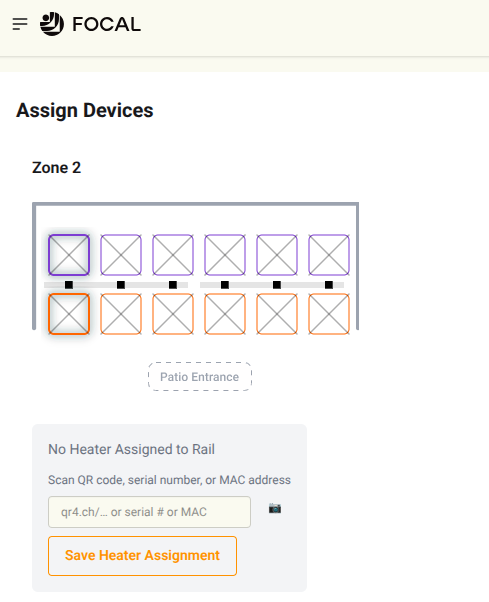
Assign Devices shows every zone, rail, and slot already created for this restaurant. Each heater shows on the map as two squares, one per heating spot. A slot marked with an X has no heater assigned yet. Tap either square of the slot you're standing under. The panel below reads No Heater Assigned to Rail, with a field for the QR link, serial number, or MAC address.
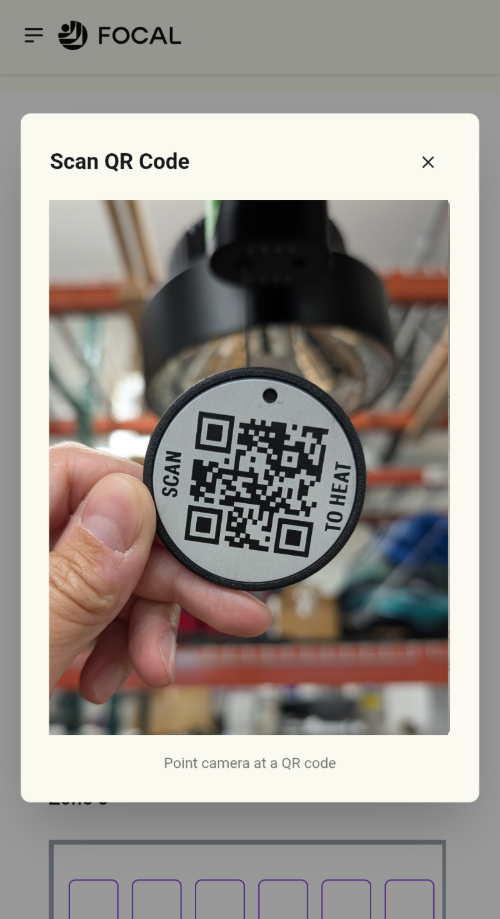
Tap the camera icon and allow camera access if your phone asks. Point the camera at the QR code on the heater in that slot: the round SCAN TO HEAT tag on the end of its pull string. The field fills in with the heater's code once it reads.
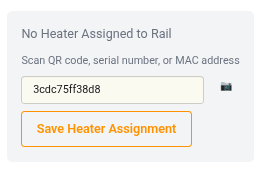
Tap Save Heater Assignment. The heater isn't assigned to the slot until you save, so don't skip this. Once it saves, the X on that slot clears.
Work along the rail slot by slot. For the next zone, scroll down. When you are done, all slots should have a heater assigned.
Confirm every assignment
After assigning every heater, it’s critical to confirm each heater was assigned to the correct slot so that the right heater turns on when commanded.
Open the menu in the top left and choose Heater Control.
Tap the first slot on the zone map. It highlights, and the heater's serial number and status appear below with heat level controls at 0.
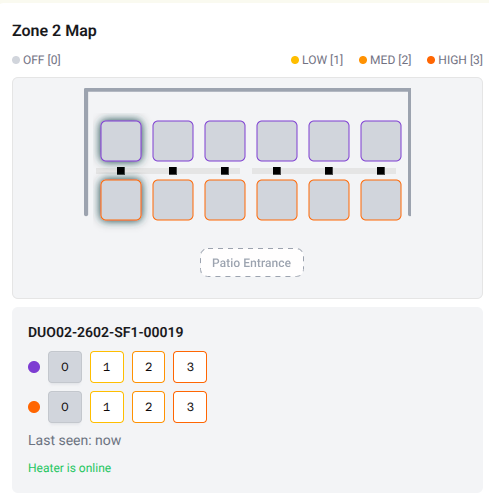
Tap 1, 2, or 3 for either spot. Look up at the heater in that slot: its LEDs should change to match the level you picked, and it should start putting out heat. If a different heater responds, the wrong heater was assigned to the slot. Go back to Assign Devices and correct the assignment.
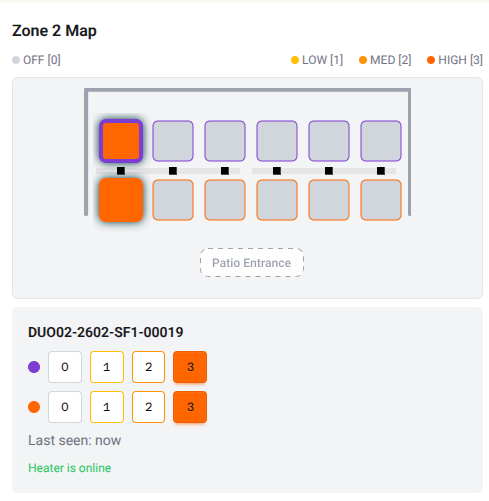
Repeat for each slot in each zone. Tap 0 on each heater to turn it off before you leave.
Final checks
- No slot in any zone still shows an X
- Each heater is assigned to the slot it physically sits in
- Every heater responded at a non-zero level with LEDs matching
- Every heater set back to 0 before leaving site
Install complete
That’s the last step of the install. Walk the restaurant through System Setup & Control before you go, so staff can run the system themselves.
If anything won’t come online or behaves oddly, see Troubleshooting. For service, replacements, or full specifications, see Warranty & Service.
Troubleshooting
v1.6 · 2026-10-15On this page
Troubleshoot Now
Follow the prompts to fix the issue, or we’ll send an email to Focal Support with the details.
Issues
Can’t control the heater
Covers offline, app, or QR code control. First give the pull string a short pull. Flashing yellow lights mean Schedule Mode is active outside its scheduled hours, not a fault — see System Setup & Control. Otherwise it’s a connectivity problem: check the affected heater has power, and if all heaters are offline, check your Focal Hub (or networking box on older systems) is plugged in and has internet — see WiFi Requirements.
 Watch this step at https://support.focalheat.co/troubleshooting/#cant-control-video
No power or lights
Re-seat the heater first (pull the string down, slide it off and back on). If other heaters on the same rail are also dark, check the rail switch (on the cord-exit end, underneath the rail) and the breaker, then test the outlet on a known-good circuit. If Focal sends a replacement heater, see Replace a Heater.
 Watch this step at https://support.focalheat.co/troubleshooting/#no-power-video
Heater isn’t heating
Confirm it has power and isn’t in Schedule Mode (see above), then try a short pull to change the heat level.
 Watch this step at https://support.focalheat.co/troubleshooting/#not-heating-video
Heater is hard to move
Pull the string all the way down before sliding it; a partial pull won’t release it.
Heater is physically damaged
Move it off the slot and secure any loose parts so nothing falls.
Don't operate a damaged heater.
Still stuck?
Run through the troubleshooting tool to send Focal Support a full report, or email support@focalheat.co directly with a photo of the heater’s QR code or serial number and what you’ve already tried.
This is the print view. Use your browser's Print (or Save as PDF) to produce the packet.